Websites that work for you.
Skash Studio is a two-person web and AI studio. We build your website, keep it running, and add AI where it pays for itself.
Simulated: each square is one job an agent handled. Point at the grid to look closer.
A site that looks right on every phone, gets found on Google, and has someone looking after it. Pay in full, or start with a smaller down payment and a monthly plan.
For a business that needs a clean, fast site that brings in calls.
For a business that wants bookings, quotes and fresh posts.
For a site that does more than inform: sells, signs people in, or connects to other software.
Launch plan payments include Essentials care, and the rest goes toward the build: $50 a month on Starter, $100 on Business. The site is yours after 21 payments on Starter or 20 on Business, or sooner by paying off what is left of the build. After 6 months it is month to month. Your domain, logo, photos and words are always yours. Extra pages are $150 each.
Month to month, for sites we build and sites we take over.
Already have a site on Wix, GoDaddy or somewhere else? We can take it over: add $50 a month and a $150 first-time checkup.
Optional, on top of any website plan.
Need an app instead? Web apps start at $6,000. AI services
A short form about your business. One of us replies within one working day.
Recent work
Florida Association of EMS Educators
A statewide association of educators needed one place where members join, find each other and keep up. Michael built it.
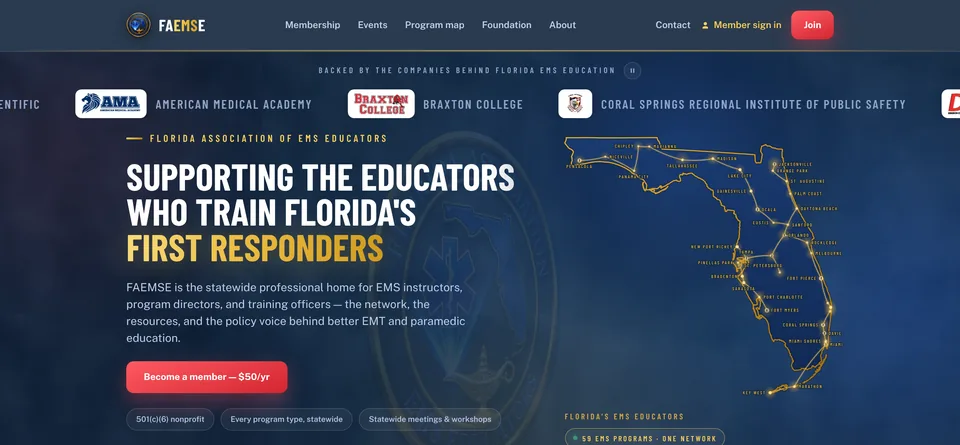
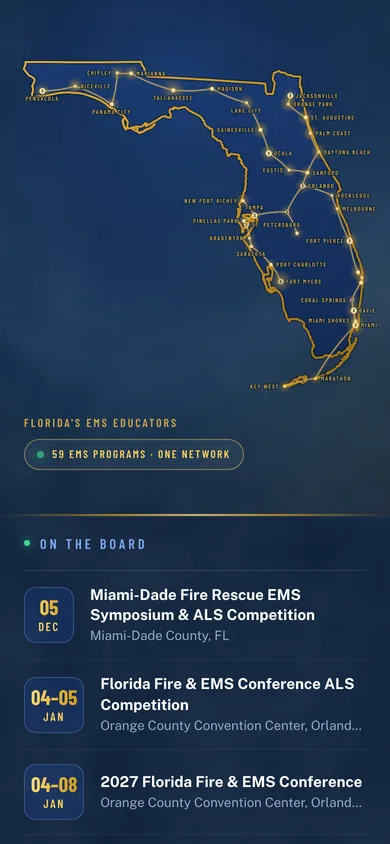
An educator picks a membership class and pays by card. Membership starts when the payment clears, and the sign-in link arrives by email.
59 training programs in 40 Florida cities, from Pensacola to Key West, with a search by city.
Members reach the question-and-answer archive, teaching videos and the member library from their own portal.
Statewide meetings, scholarship deadlines and national news in their field sit on the home page, so nobody has to go looking.
Most AI projects stall somewhere between the demo and the day‑to‑day. That gap is where we work.
A demo only has to work once. A system your team relies on has to work on the bad days too: the odd request, the missing record, the caller who changes their mind halfway through.
We scope for that, build for that, and test for that before anyone depends on it.
Six kinds of AI work, on their own or added to your site. If you are not sure which one you need, start with the first.
See what these look like for your kind of businessWhere each one works
Choose an area to see which kinds of work reach it.
A short, fixed-scope look at how your business runs. You get a ranked list of where AI would pay for itself, where it would not, and what each option would take to build and run.
Agents that hold a real spoken conversation: answering the phone, taking bookings, handling intake, or playing a role for staff training. They stay on script where it matters and hand off to a person when they should.
The repetitive middle of the business, handled by software that can read, decide, and act: documents, inboxes, scheduling, reporting. It works inside the tools you already use.
A private assistant that knows your business: your documents, your data, your way of doing things. It answers with its sources, and it only sees what you allow.
Scorecards that tell you whether the system is right before your customers do. We run them on every change and keep watching after launch.
Hands-on sessions that get your people using AI well in the jobs they already have. Built around your real work, not a slide deck about the future.
Three example jobs, start to finish, simulated so you can follow them. Each bar is one step the system takes. Its length shows how long it took, and its color shows what kind of step it was.
A supplier invoice arrives by email
Handed to a personHeld for review. The invoice lists 40 units and the order lists 36. Sent to accounts payable with both documents attached.
Point at any step to see inside it, or drag the time bar to move through the run.Tap any step to see inside it, or drag the time bar to move through the run.
A customer calls to move a service visit
DoneVisit moved to Thursday at 2:00 pm. Confirmation sent by text.
Point at any step to see inside it, or drag the time bar to move through the run.Tap any step to see inside it, or drag the time bar to move through the run.
A customer asks about a refund
DoneRefund of $84 approved. It is inside the 30-day policy and under the $150 limit the business set. Reply sent, with the policy quoted.
Point at any step to see inside it, or drag the time bar to move through the run.Tap any step to see inside it, or drag the time bar to move through the run.
Every system we build keeps a record like this, so you can see what it did and why.
Four stages. You can stop after any of them and keep what was built.
We sit with the people who do the job and map where the hours go. You get a shortlist ranked by payoff and risk.
We build the riskiest part first, on your real data, and measure it. If it does not hold up, you find out early and cheaply.
The full system, with tests, guardrails, and a way for a person to step in. You see working software as it comes together, not a status report.
We watch it in production, tune it, and train your team. You own everything: the code, the prompts, the accounts.
Some problems need a spreadsheet, a hire, or a phone call. If that is the answer, you will hear it from us first.
Your domain, logo, photos and words are yours from day one. A site paid in full is yours at launch; on a launch plan, once the build is paid off. Code, prompts and accounts from AI work are yours from day one.
Every system comes with tests that show it works on your cases, including the awkward ones.
You set the limits. Inside them the system acts; past them, wherever a mistake would cost you money or trust, it asks a person first.
We pick the model that fits the job and keep it swappable, because the best one changes every few months.
When you hire Skash Studio, you work with the two of us. The people who scope your project are the people who build it and the people who pick up when something breaks.
Michael Saco
Co-founder, AI Systems Architect
Designs and builds websites, AI voice agents and the operations tools around them, for places where a wrong answer has consequences. Recent work includes the website of a statewide professional association.
Jorge Anzardo
Co-founder
A few lines is enough. We read every message ourselves and reply by email.
Or write to skashstudiosupport@gmail.com
Message sent.
Within one working day
One of us replies by email.
A 30-minute call
We set up a call to hear the problem in your own words.
Within a week of the call
You get a short written plan with a price. Saying no is fine.